Forum Replies Created
-
 KalpeshKeymaster# 7 years, 10 months ago
Hi Peter,
We have received your email and now understand the issue.
Right now additional profile attributes are visible to the user only and not admin.
If you login with any WordPress user (other than admin), and go to profile page of the logged in user you should be able to see the additional attributes.
Do you also need to have them visible from the Admin dashboard?
Thanks,
Kalpeshin reply to: Adding attributes to wordpress user profilesKalpeshKeymaster# 7 years, 10 months agoHi Peter,
Thanks for sending the plugin version.
As you said you can see extra attributes on the profile page, can you tell me where you do not see the attributes (please attach screenshot)? Are you trying to use
get_user_meta()function?Can you please explain the issue with screenshots. You can upload screenshots to Dropbox or other file sharing service and share the link.
Thanks,
Kalpeshin reply to: Adding attributes to wordpress user profilesKalpeshKeymaster# 7 years, 10 months agoHi Peter,
Can you send us the screenshot of your attribute mapping configuration on support@miniorange.com so that we can take a look.
Also, please include the version of the plugin you are using.
Thanks,
Kalpeshin reply to: Adding attributes to wordpress user profilesKalpeshKeymaster# 7 years, 10 months agoHi Daisy,
We have activated the plugin license but the issue is still there.
We will send you the new version of Social Login premium plugin with the fix very soon.
Thanks,
Kalpeshin reply to: Social login bugKalpeshKeymaster# 7 years, 10 months agoHi Josh,
Thanks for reaching out.
Can you tell us how your users login today in OpenVPN? Do they login with OpenVPN credentials or do you have LDAP connected to OpenVPN?
We support two factor with OpenVPN using RADIUS authentication. You can check the document below.
https://www.miniorange.com/2-factor-authentication-for-vpn-loginAlso, if you want we can setup a demo for you or setup a call if you want to talk.
Thanks,
Kalpeshin reply to: openvpnKalpeshKeymaster# 7 years, 10 months agoHi Ronand,
Thanks for your reply. I will need some screenshots to understand the issue, I will send you more details on your email.
Thanks,
Kalpeshin reply to: user rolesKalpeshKeymaster# 7 years, 10 months agoHi Ronald,
Thanks for reaching out.
Can you please tell us which product you are using so that we can assist you better with the exact steps to add new roles.
Thanks,
Kalpeshin reply to: user rolesKalpeshKeymaster# 7 years, 10 months agoHi James,
Thanks for reaching out. I will suggest you the same solution above.
Please follow the steps below,
1) Go to “Sign In Settings” tab in OAuth client plugin
2) Configure “Custom redirect URL after logout” with logout URL of OAuth Provider.So on logout event from WordPress, we will send logout request to your OAuth provider to achieve logout from all apps.
Can you tell me plugin version you are using to confirm if this is supported with your version?
Thanks.
in reply to: Forgetting login tokensKalpeshKeymaster# 7 years, 10 months agoHi Sandeep,
Thanks for reaching out.
For the issue you are getting, did you try accessing google login URL (https://accounts.google.com/o/saml2/idp?idpid=C04k3fo2d) directly? This won’t work, instead, you need to initiate SSO from SSO link on the WordPress site.
You can use the link below for SSO.
https://<wordpress-url>/?option=saml_user_loginThe feature you have mentioned (auto-redirect, advanced attribute and role mapping) are supported in our premium version. If you want to try out our premium plugin, we can setup a demo on our cloud environment and can provide you with the access.
Looking forward to your reply.
Thanks,
Kalpeshin reply to: Google SAML IntegrationKalpeshKeymaster# 7 years, 10 months ago@Mike, I have received your email. We will let you know the right configuration once we verify it on our end.
in reply to: SAML issue with AWSKalpeshKeymaster# 7 years, 10 months ago@Rivaben, Can you please share a screenshot of miniOrange application configuration you added?
Also, please share SAML response with SAML Tracer tool so that we can get the exact issue.
You can send the details on support@miniorange.com
in reply to: SAML issue with AWSKalpeshKeymaster# 7 years, 11 months agoHi Derek,
Looks like you have not configured the Cognito Logout URL in our plugin so that if user logout from WordPress our plugin can logout the user from Cognito as well.
Please follow the steps below to do that,
1) Go to “Sign In Settings” tab in OAuth client plugin
2) Configure “Custom redirect URL after logout” with logout URL of CognitoLet us know if anything does not work for you.
in reply to: Forgetting login tokensKalpeshKeymaster# 7 years, 12 months agoHi Muhammad.
Can you please confirm if you have enabled applications for users.
You need to perform steps below for that.
Go to configured SAML App, click on the menu link corresponding to your app (See the screenshot below). Then select ON for everyone.
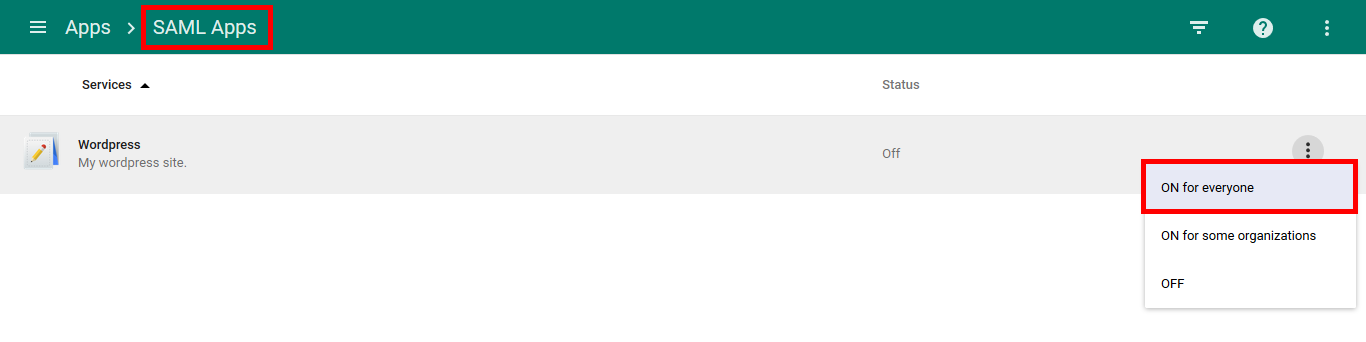
Let me know if you still see the issue.
in reply to: Google Apps SSO


