Forum Replies Created
-
shweta
Participant# 5 years, 6 months agoHello Snorre,
Thank you for getting in touch with us.
Yes, you can definitely enable the 2FA for new users automatically. There is a provision in the addon using which you can achieve this use case.
Please perform the below steps to automatically enable the 2FA for newly created users.
- Navigate to the User Management -> 2FA For Users tab.
- Click on the Bulk 2FA Action drop Down
- Select Enable 2FA option from the All Users section
- Click on Apply button.
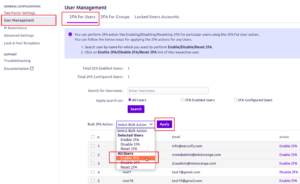
Now, the addon will automatically enable the 2FA for existing as well as new users.
This is how you can enable 2FA for newly created users.
Let me know if this helps you.
Thanks,
Shradhain reply to: Jira 2FA auto-enable for new users?Participant# 5 years, 11 months agoHi Daniel,
Please make sure the User Profile > Disable Attribute Mapping option is not set while using Custom Attribute Mapping.
To check custom mapped attributes you can go to User Management and select logged-in user.
Here you will get to see a Properties section with a list of key and value pairs. These key and value pairs are nothing but your custom attributes which you must have mapped in the plugin.
Please note the custom attribute mapping only affects after Single Sign On.
Let me know if this helps.
Thanks,
ShradhaParticipant# 7 years, 2 months agoHi Westwin,
Thanks for sharing logs.
I am not able to see the name claim attribute in the logs.We tried to reproduce the issue on our end but no luck.
Could you please decode your id_token and attach response here?
(Looking for mainly name claim attribute, email attribute in the response.)If possible we can also set up a quick call and help you solve the issue.
Thanks,
ShradhaParticipant# 7 years, 2 months agoHi Westwin,
Thanks for pointing out the issue.
This could be because of using the Standard Base64 Decoder class.We are trying to reproduce the issue on our end.
Could you please attach plugin logs at atlassiansupport@xecurify.com?
This will help us to check the id_token response and parse it in the plugin.Steps to fetch logs are provided under the Troubleshooting section.
Looking forward to hearing from you.
Thanks,
Shradha


